What is n8n? An overview with practical workflow automation examples
Interest in workflow automation reached a new high in 2025. Anyone who looks into the topic sooner or later comes across n8n. The open-source tool promises that almost anyone can automate complex workflows without extensive programming knowledge.
What is n8n? Key points
- n8n is an open-source, visual workflow automation platform that connects apps, APIs, and data.
- Its node-based interface makes even complete processes easy to follow visually, and you work in it intuitively by drag and drop.
- You can build workflows with or without AI, depending on how far you want to automate and how complex the task is.
n8n: what is it?
n8n is an open-source platform for workflow automation. It lets you connect different apps, services, and data sources to automate tasks and workflows without writing code yourself. n8n works through a visual, node-based interface that makes it easy to build automated processes.
n8n facts and figures
- n8n is a German startup founded in Berlin in 2019
- At the end of 2025, the company was valued at more than 2.5 billion US dollars after investments from well-known firms such as Nvidia and Sequoia Capital
- By March 2025, n8n already had 230,000 active users, and the number is still growing
- Major n8n customers include Stepstone and Delivery Hero
What are the advantages of n8n?
n8n’s advantages come from its architecture and its powerful features. It combines the flexibility of code with the speed of a low-code interface, and self-hosting gives you full control.
Architecture
Self-hosting option: You can host n8n yourself, for example with Docker, through an npm installation, or on common hosting platforms. The Community Edition is free to run, while the paid editions (from €20/month) add features and support.
Flexible licensing model: n8n uses a fair-code license with openly viewable source code and can be extended with enterprise licenses. The enterprise editions include extended permissions and single sign-on, among other things.
Clear interface: n8n is built around a node-based visual editor, in which you use triggers, action nodes, and branches to orchestrate the data and tools you need.
Features
Workflow automation: n8n lets you set up workflows that automate specific processes partly or completely. AI agents make n8n workflows even more powerful.
Template library and integrations: More than 400 integrations and 900 workflow templates speed up the implementation of typical use cases for your processes.
Documentation for AI workflows: n8n documents how to integrate any LLM, agentic workflows, AI nodes for embeddings, and data connections.
Code integration: When needed, you can add your own JavaScript or Python logic to workflows. On self-hosted instances, you can also use additional npm or Python libraries.
How n8n works, with examples
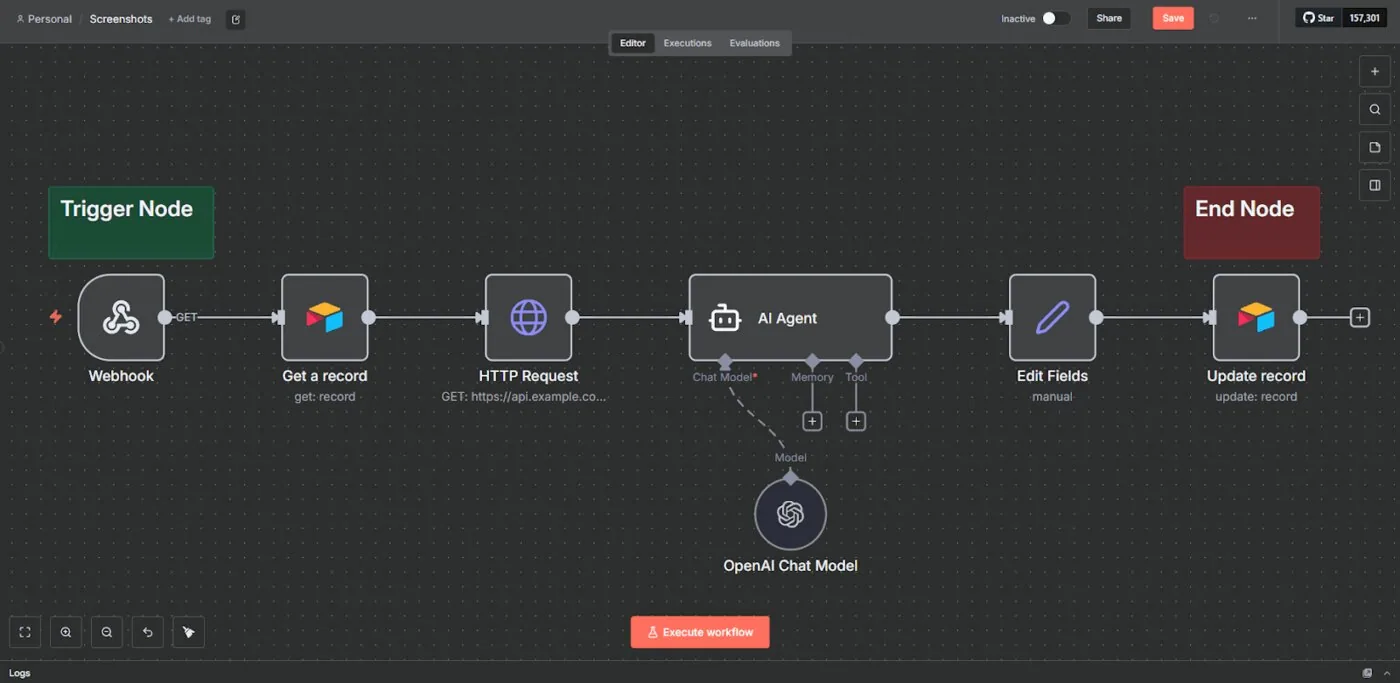
In n8n, you link actions (“nodes”) from applications, databases, and APIs and set them up as an automated workflow that runs in response to events. Whatever the individual workflow does, it always follows the same sequence:
- Start with a trigger (“trigger node”): A form sends an HTTP request (webhook), a workflow is set to start at 8 a.m. every day, or you start the workflow manually.
- Running the nodes: n8n then executes the predefined actions along the connections and passes intermediate results from node to node.
- Data validation and transformation: Incoming data is checked, normalized, and converted into the required format so that the following steps work reliably.
- Carrying out actions: The node reads data from and writes data back to your systems via HTTP APIs, database nodes, or SaaS connectors.
- Completing the workflow: The workflow ends once the last linked action has run. For workflows triggered by a webhook, you can also control when the HTTP response is sent: “immediately,” “when the last node finishes,” or explicitly “using the Respond to Webhook node.”
Info: A standard workflow for simple automations can run in n8n entirely without AI. AI agents open up further powerful, customized ways to map your processes.
AI agents in n8n
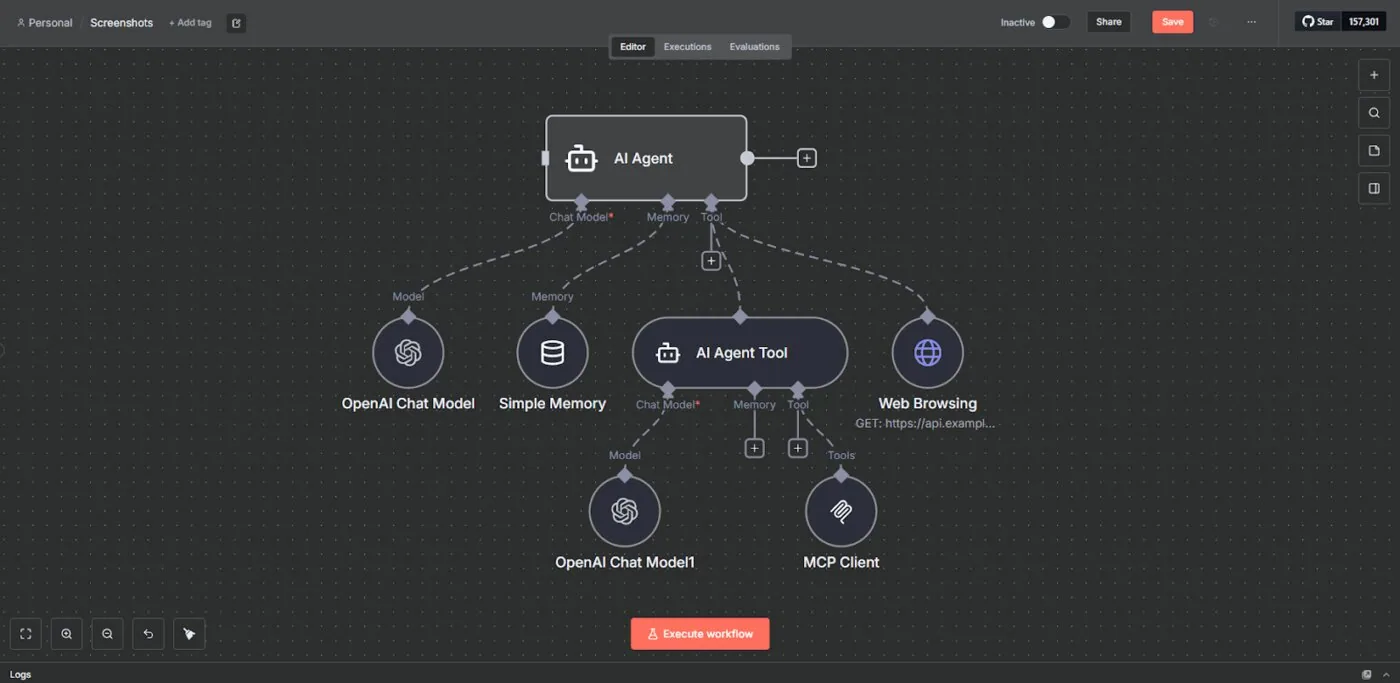
AI agents in n8n are special nodes that you can equip with chat models (ChatGPT, Claude Sonnet, etc.), databases, and a wide range of tools (email, coding, project management, etc.) to suit your needs.
With AI, your n8n workflows become personal assistants that follow your rules and open up further automation potential.
5 examples of n8n in use
n8n is so popular because there are almost no limits to what companies can automate with it. Here are some of the most common use cases:
IT incident automation
Incoming IT alerts trigger a workflow that creates tickets, updates statuses, and notifies the right teams.
Lead enrichment in marketing
New leads from the CRM are enriched via HTTP nodes, deduplicated, and segmented. They are then passed on to email tools automatically.
Processing incoming invoices
The workflow extracts attachments from a mailbox, recognizes structured data via external APIs, and posts it directly to your ERP system through an integration.
Coordinating HR onboarding
Once a new person is created in the HR system, the workflow sets up access to the relevant tools, notifies the departments involved, and logs each step.
AI-assisted summaries
AI nodes summarize meeting notes, enrich them with company data, and distribute them automatically. Optionally, the workflow can also generate recommended actions or suggestions for improvement.
n8n workflows and AI agents from Lucid Labs
Want to put n8n to work for your company’s processes? Instead of spending a lot of time and effort building workflows and AI agents yourself, get in touch with Lucid Labs.
As an n8n agency and verified n8n Expert Partner, we connect n8n with AI agents, your company knowledge, and your existing systems to automate everyday tasks where it matters most. The goal is a first agent in production in under 30 days, integrated seamlessly into your processes.
Beyond n8n, we specialize in end-to-end AI integration for mid-sized companies:
- A quick start with our AI workshop
- Developing a guided AI strategy
- Long-term AI consulting
We always prioritize the best quick wins, so that your time savings, and with them your ROI, are as large as possible.
Get in touch today, free and with no commitment, and let’s identify your AI potential together.
FAQ
How much does n8n cost?
n8n is open source, and you can self-host the Community Edition. You pay only for your server and get practically unlimited workflows and executions. The paid plans include cloud services and are priced in tiers according to scope:
- Starter, from €20/month
- Pro, from €50/month
- Business, from €667/month
- Enterprise, price on request
What is the difference between n8n and Zapier?
Zapier is probably the best-known alternative to n8n and also automates workflows. Many users find Zapier somewhat more beginner-friendly, but n8n offers more customization for complex workflows and the option to self-host.
When is n8n a good fit for my company?
n8n is ideal for complex, AI-heavy workflows in companies that want to avoid the high per-task fees of conventional SaaS tools and still have flexible, in-depth customization options.