Venn.ai: The action layer between AI tools and business apps
If you use ChatGPT, Claude, or Cursor every day, you have probably hit a limit you can’t quite name: the tools answer any question, but they can’t act in your workspace on their own. They don’t log a Salesforce entry, send a Slack message, or open a Jira ticket. At the end of an excellent AI conversation, someone still has to copy the results into the business system by hand. Venn.ai closes exactly this gap. It connects the major AI assistants to your business apps and gives you granular control over which actions the AI is actually allowed to take. We look at where Venn.ai pays off for mid-sized companies and where its limits are.
Venn.ai – As of April 2026:
- Launched on Product Hunt on March 26, 2026
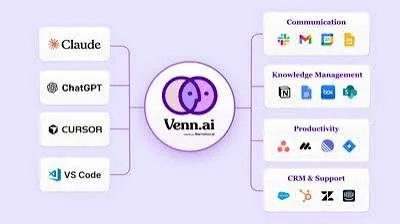
- Connects Claude, ChatGPT, Cursor, and VS Code to key business software, including Salesforce, HubSpot, Jira, Notion, Slack, Gmail, Google Workspace, Stripe, QuickBooks, Shopify, and many more
- One MCP URL: you set permissions once and they apply to every connected AI tool. The Tool IQ layer loads only the tool definitions relevant to each task into the context
- Action-level permissions (“draft but don’t send” and “update but don’t delete”); write operations require user confirmation
- Two pricing plans at present: Basic (free) and Pro ($5/month)
What is Venn.ai?
Venn.ai is an “action layer” for AI tools. Instead of running its own AI, the platform connects assistants you already use, such as Claude, ChatGPT, Cursor, or VS Code, to your workplace apps. You set up the connection once through a central MCP (Model Context Protocol) URL, and every connected AI tool then inherits the permissions you defined.
Two architectural decisions make the technical difference:
- “Tool IQ” layer: Classic MCP setups typically load every tool definition into the AI context at once, and that is their main weakness. Venn.ai selects only the tools relevant to each task. This keeps the context lean and the AI’s performance high.
- Action-level permissions: For each app, you define whether the AI may read, create, update, or send. Write operations require user confirmation before they run. The marketing lines “draft but don’t send” and “update but don’t delete” describe the typical safe default configuration.
Venn.ai is backed by Barndoor.ai, an AI governance company that has raised significant funding for its enterprise control plane. Venn.ai is positioned as a more accessible standalone product for individual users and small teams.
What is Venn.ai good for?
Connecting AI agents to the CRM (sales and customer success)
The classic problem: ChatGPT or Claude write excellent call summaries, but nobody enters them into the CRM. With Venn.ai, the AI agent logs the note from Notion straight into Salesforce or HubSpot and adds the follow-up meeting to the calendar. Permissions can be set per action, and “draft but don’t send” keeps emails from going out by accident. For sales and customer success teams at mid-sized companies, this closes the most painful gap: the one between “the AI writes a note” and “the note is in the system.”
Turning Slack threads into structured tickets
Marketing, operations, or customer success teams can collect feedback in a Slack channel. Through an AI assistant, Venn.ai reads these threads and creates structured tickets in the Jira backlog or on a Linear board. The AI model handles the classification, and each write operation is confirmed before it runs. Recurring manual ticket creation goes away, and feedback no longer trickles away unnoticed in Slack channels.
Automating accounting and reporting workflows
Do you still copy Stripe payments, QuickBooks invoices, and bookkeeping entries into a cash-tracking sheet by hand every month? With Venn.ai, you can let an AI assistant do it: pull data from several accounting apps, append it to the Google Sheets spreadsheet, and write a short briefing for management. For finance and controlling teams at mid-sized companies, this is recurring click work that is easy to hand off.
One MCP setup for teams with several AI tools
Mid-sized companies that use Claude for writing, ChatGPT for brainstorming, and Cursor for code normally have to configure app permissions separately for each tool. Venn.ai solves this with a single MCP URL: you set permissions once, centrally, and every connected AI tool inherits them. On top of that, the “Tool IQ” layer sends only the tool definitions relevant to each task into the AI context instead of all of them at once. For teams running several AI tools, this noticeably reduces maintenance effort.
Our assessment
Where Venn.ai pays off
- For mid-sized companies that use ChatGPT, Claude, or Cursor every day and want to move beyond chatting to actually taking action.
- For teams running several AI tools side by side that don’t want to configure app permissions for each tool separately.
- For sales, operations, and customer success workflows between CRM, ticketing system, and accounting that still run manually today.
- For risk-conscious teams that want granular guardrails on AI actions.
Where Venn.ai is the wrong choice
- For business-critical production systems, Venn.ai is still too young; it lacks a multi-year track record.
- For regulated industries with strict GDPR obligations and EU data residency requirements, the documentation is missing, and a US cloud service is not easy to fit into every compliance framework.
- For workflows in legacy industry software without an API, Workbeaver (visual UI automation) is the better fit.
- For classic trigger-based workflows, Zapier and Make are more mature.
Lucid Labs recommendation
We recommend piloting Venn.ai on clearly scoped workflows in sales, operations, or customer success, ideally on the free tier, to judge how mature it is in practice. The tool closes a real gap that anyone who works with AI assistants every day will recognize, but it is too early to recommend it as an unquestioned company standard. Before a production rollout in contexts with demanding GDPR requirements, clarify the data protection documentation directly with the vendor.
FAQ
How is Venn.ai different from Zapier, Make, or IFTTT?
Zapier, Make, and IFTTT are trigger-based workflow tools (if X happens, do Y). Venn.ai is built around the AI user: the AI model plans the action in natural language, and Venn.ai carries it out within the permissions you have set. That makes Venn.ai a complement to Zapier, not a direct alternative. If you already have a mature Zapier setup, add Venn.ai for AI-driven ad hoc actions rather than replacing what you have.
How exactly do the permission controls work?
In a central dashboard, you configure for each app which actions the AI may take: read, create, update, send. Write operations also require user confirmation before they run. Typical defaults such as “draft but don’t send” or “update but don’t delete” prevent critical actions from happening by accident.
Can Venn.ai be used in a GDPR-compliant way?
Venn.ai is cloud-based and operated by the US company Barndoor.ai. The available sources show no detailed GDPR documentation, no EU data residency, and no dedicated data processing agreement. In industries with strict GDPR requirements, you must clarify this directly with the vendor and carry out a data protection impact assessment before using the tool in production.